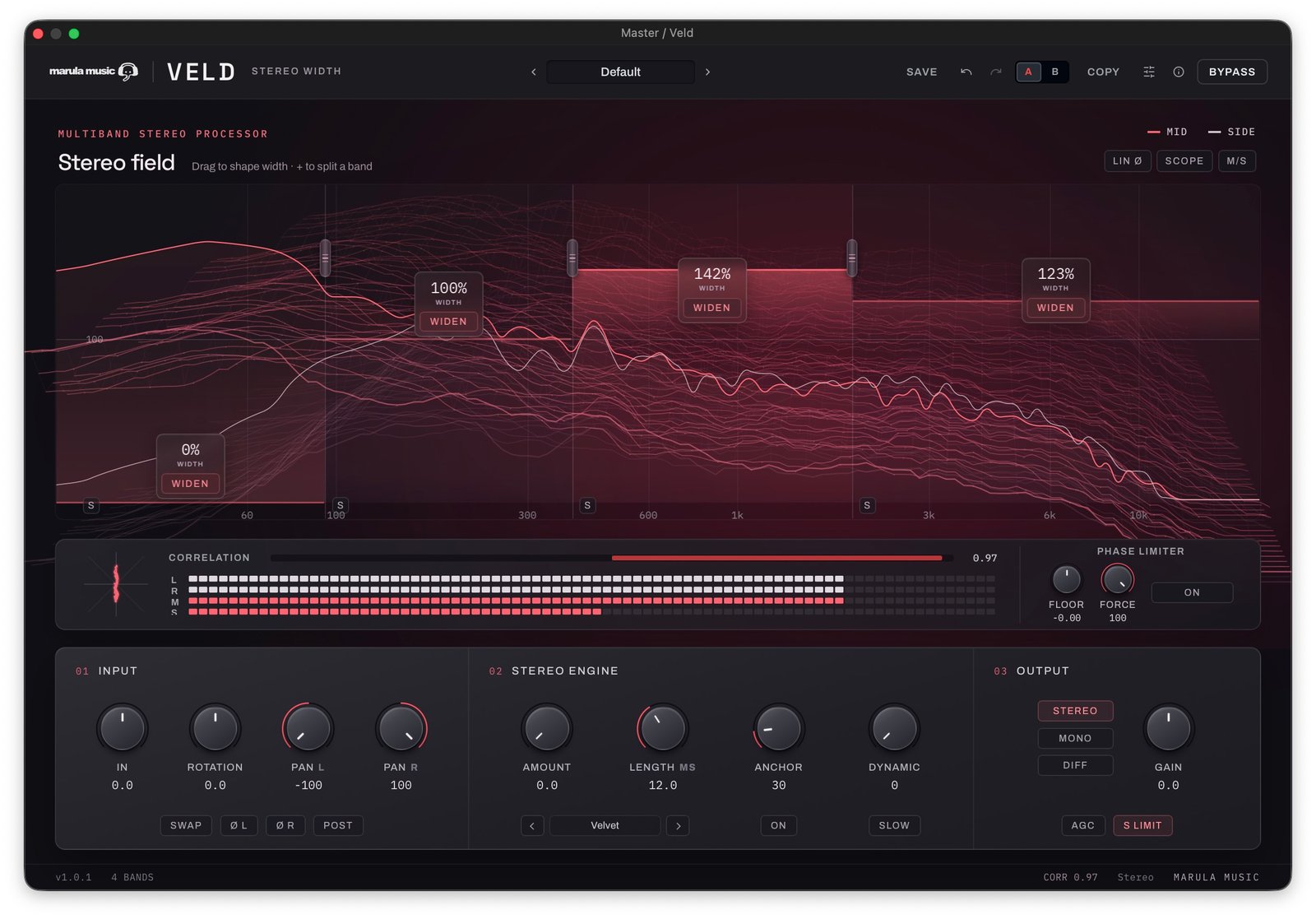
Stereo widening with Veld: mono bass and centred transients
How I use stereo widening in Veld, from keeping the low end mono to adding width to synths and controlling drum transients.
Notes
I built Veld because I wanted a stereo processing toolbox for mastering. I've since used it on my own mixes and on masters for clients, but the controls are useful on individual tracks as well. In the video above, I go through stereo widening on drums, bass, strings and synths, including generating stereo information from a mono source.
The first decision is what part of the sound needs to be wider. A bass line can have a mono low end and a wider upper section. A drum can have a centred attack with width in its decay. Veld gives me separate controls for those jobs.
Adjust existing width or generate stereo information
Mid/Side width changes the balance between the centre and the sides. If a source already contains stereo information, increasing the Side level can make it wider. If it is completely mono, there is no existing Side signal to turn up.
Veld's Stereo Engine can generate that information. The four modes are Haas, Allpass, Velvet and Chorus, and each has a different character. The generated signal is added to the sides, with opposite polarity in the left and right channels, so that contribution cancels when they are summed to mono.
That describes the generated width path. Rotation and panning have their own effect on the signal, so I still check the whole result in mono after making changes.
Keep the low end mono without narrowing everything
In the walkthrough I split the signal at 75 Hz, bring the low band's width down to mono and turn off WIDEN for that band. I can then work on the width above the crossover without applying the same treatment to the bass.
Veld supports up to four bands. There is no need to use them all: one crossover is enough for this example. The 75 Hz setting suits the demonstration, but I would choose the crossover by listening to the actual mix and what the bass is doing.
This is useful on a full mix, and also on a bass sound with upper harmonics that could benefit from stereo widening. I want to hear the added width without losing the low-frequency focus.
Listen to the four stereo engines
Haas uses a short delay to create width. Changing the timing changes the character, so I listen for coloration as well as the apparent spread.
Allpass gives me a different, often subtler result. Velvet uses velvet-noise convolution and can create a more diffuse spread, though it can also ring when pushed. Chorus adds modulation, which can be useful on a synth or the upper part of a bass.
In the video I use a mono sawtooth from Bitwig's Polymer to make the difference easy to hear. Turning up existing Mid/Side width cannot create stereo information from that mono source, but enabling WIDEN brings in the engine. I compare the sound with MONO and DIFF as I adjust it.
Keep drum attacks centred with Anchor
When I add width to drums, I don't always want the attack to spread as much as the tail. Anchor reduces the generated width around fast transients and lets it return afterwards.
That gives me a way to keep the initial hit more centred while hearing the spread in the decay. It controls the generated width; it does not automatically make every part of an existing stereo drum recording mono.
Listen to the attack and the space immediately after it while adjusting Anchor. If the drum loses its placement, bring the amount back or change the recovery.
Make width respond to the audio with Dynamic
Dynamic changes the width in response to the programme. The slow and fast controls let me shape how that movement follows the source.
On drums, this can bring out width in the space between hits. It is also useful on sustained material where I want the image to move with the sound. The response comes from the audio; it is not an internal tempo-synchronised LFO.
For other movement, I demonstrate using Bitwig's modulators with Veld. That modulation is coming from the DAW.
Use correlation and mono checks together
The correlation meter helps me see how the left and right channels relate. A reading of +1 indicates matching channels. Negative readings deserve attention, particularly in the low frequencies, but the meter does not replace listening.
Veld's Phase Limiter responds to correlation by reducing Side information towards the chosen Floor. Force controls how strongly it works. It is separate from S LIMIT, which deals with Side peaks, and neither name should be taken to mean a conventional final output limiter.
I use MONO to hear the summed result and DIFF to hear the Side content. AGC helps compensate for level changes while adjusting the processing. These controls make it easier to hear whether stereo widening is helping the source in the mix, rather than simply making the comparison louder.
Place a stereo source with dual panning
A conventional stereo balance control can turn down one channel when I move it towards the other side. Veld's dual pan lets me position the left and right channels separately.
That is useful when I want to place a stereo instrument in a narrower area of the mix while retaining both channels. It can also change the level, so I check the gain as well as the position. Rotation is another control for changing the stereo image, and POST lets me move the panner after the stereo engine.
Questions from the walkthrough
Can Veld make a mono synth stereo?
Yes. Enable WIDEN and use the Stereo Engine to generate Side information. The mono Polymer sawtooth in the video is an example.
Should every mix be mono below 75 Hz?
No. That is the crossover used in the demonstration. Choose it for the material and compare the result in the mix.
Does the Phase Limiter replace mono checking?
No. It controls Side information in response to correlation. I still listen with MONO after changing the width, engine, rotation or panning.
You can find Veld on the plugin page. If you want updates on my plugins and sound design work, you can join the newsletter.